Firmware Update
Updating firmware can provide new features and stability updates. We recommend keeping the firmware up to date.
Update Using HINATA Go
WARNING
This update method only supports the following conditions:
- Firmware version 2025040400 or later
- Only supports Android / macOS / Linux / ChromeOS
- Linux requires udev rules to be configured in advance
Visit HINATA Go in a browser to update online:
This method does not require downloading additional tools and is suitable for non-Windows users.
Update Using HINATA Client (Windows)
On Windows, use the HINATA Client tool to update firmware.
Download HINATA Client
Getting Started
After extraction, the following files should be present:
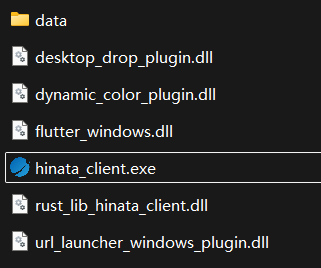
Double-click hinata_client.exe to open HINATA Client.
Firmware Update
Click firmware update in the sidebar to enter the firmware update page and perform the update.