Modify Game Port Numbers
INFO
If you do not have the need to switch between CHUNITHM and maimai/ONGEKI, and have no other special requirements, you can safely ignore this section.
WARNING
This article only applies to users connecting via the SEGA official serial protocol.
If you modify the configuration files according to the tutorial below but later want to use virtual reading (Enter key) or AimeIO, please be sure to restore the configuration files to their default settings, otherwise they will not work properly.
Introduction
| Game | Default Port Number |
|---|---|
| maimai DX | COM1 |
| ONGEKI | COM1 |
| CHUNITHM | COM4 |
The above are the default port numbers for the GekiChuMai games, but they are not fixed. Users can change the reader port number used by the game by modifying the configuration files.
Imagine a scenario:
You have only one computer and one reader, but want to play multiple SEGA rhythm games.
maimai and ONGEKI typically only need to be set once since they have the same default port number.
CHUNITHM has a different port number, hence the need for this tutorial.
Currently, most SEGA games use AMDaemon, and reader-related settings are managed uniformly by AMDaemon.
Players can change the reader port number required by the game by modifying the configuration file passed to AMDaemon.
File Modification
File Introduction
The following are AMDaemon configuration files that may exist in a normal game directory:
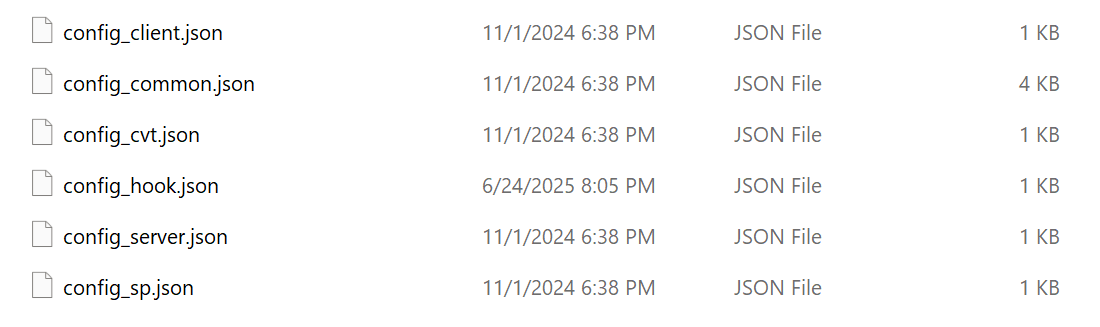
config_client.json,config_server.json
Related to distribution servers, can be ignored for this articleconfig_hook.json
Comes with Segatools, used to forcibly override some settingsconfig_cvt.json,config_sp.json
CHUNITHM specific configuration filesconfig_common.json
Configuration file common to all games
Typically, reader port number configuration is located in config_common.json.
However, for CHUNITHM, you need to modify config_cvt.json or config_sp.json depending on the cabinet type used at startup.
Modification Method
Open config_common.json or config_cvt.json / config_sp.json, and look down for the aime entry:
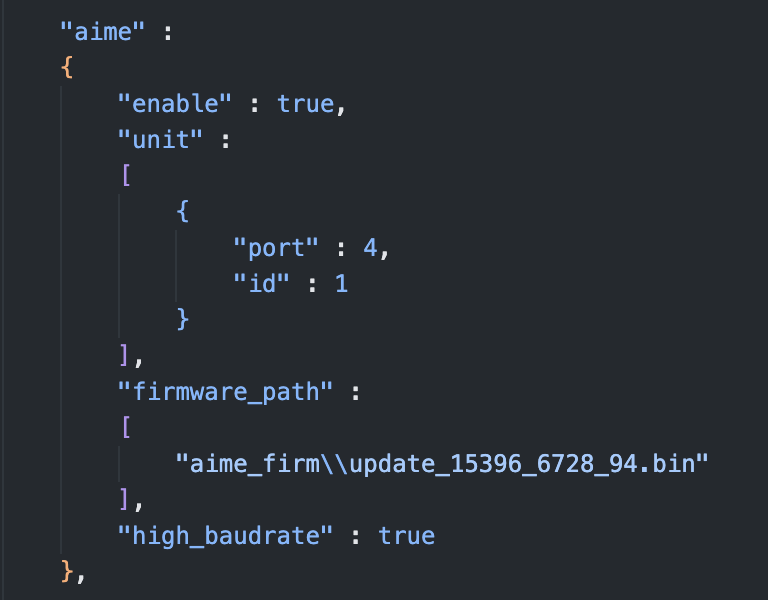
Where:
"port": 4Here, 4 is the port number used by the reader (corresponding to COM4).
You can modify it to another port number not occupied by official devices.
Note: What are "other port numbers officially used"?
Take CHUNITHM as an example. SEGA officially uses COM1 to connect to the Ground Slider (ground key touch panel), so COM1 cannot be used when modifying the reader port number.
Below are the port numbers occupied by official games and cannot be used for readers:
| Game | Occupied Port Numbers and Purpose |
|---|---|
| maimai DX | COM2: VFD screen COM3 / COM4: 1P / 2P touch screen COM21 / COM23: Light board |
| ONGEKI | COM2: VFD screen COM3: Light board |
| CHUNITHM (SP) | COM1: Touch panel COM2: VFD screen COM20 / COM21: Light board |
| CHUNITHM (CVT) | COM1: Touch panel COM2 / COM3: Light board |
All the above port numbers cannot be used as reader ports.
Use Case Description
Requirement:
I have only one computer and one reader, but want to switch between playing CHUNITHM and maimai.
You can follow these steps:
- Edit maimai's
config_common.jsonand change the reader port number toCOM7 - Edit CHUNITHM's
config_cvt.jsonorconfig_sp.json, and also change the reader port number toCOM7 - Open Windows Device Manager, change the reader's actual port number to
COM7, and replug the reader
After completion, you can switch between the two games without repeatedly changing the reader port number.